June 3, 2025
Hello Everyone,
I wrote this blog to explore the functionality of EDR killers and how threat actors leverage them to avoid detection during attacks. EDR killers are tools used to disable Endpoint Detection and Response (EDR) solutions like CrowdStrike, SentinelOne, Windows Defender and Sophos. Threat actors deploy these to neutralize a machine’s EDR system, crippling its monitoring and detection capabilities. Once an EDR killer is successfully executed, attackers can conduct further exploitation, move laterally across networks, and deploy ransomware to encrypt systems.

Numerous EDR killers exist in the cybersecurity landscape, and I’ve chosen to analyze one in particular: the AuKill malware. In this blog, I’ll dive into the technical details and interesting aspects of the AuKill EDR killer, which has been employed by ransomware groups like LockBit and Medusa to disable EDR solutions, paving the way for their malicious activities.
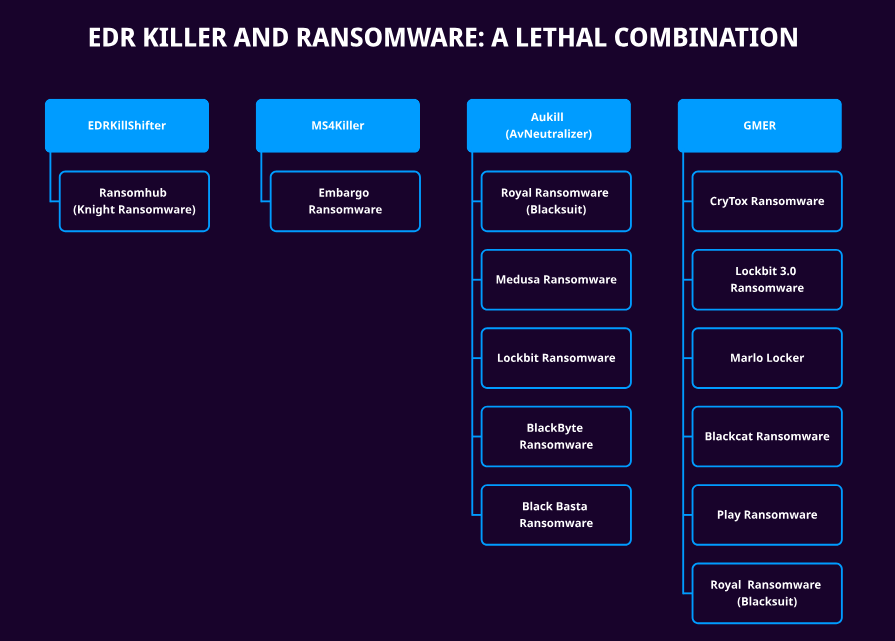
The AuKill malware employs a Bring Your Own Vulnerable Driver (BYOVD) technique to disable Endpoint Detection and Response (EDR) processes. It leverages an outdated and vulnerable driver, PROCEXP.SYS, to terminate EDR processes. AuKill is highly customizable, allowing attackers to target specific EDR solutions based on the victim’s environment. For my research, I’ve selected an AuKill sample configured to disable Sophos and Windows Defender.
Before diving into the technical details of AuKill, I’ll first cover some key background information and context about the malware.
- Why is it hard to kill an EDR process?
- Why do we need a driver to disable the EDR process?
- What is PROCEXP.SYS?
Why is it hard to kill an EDR process?
EDR processes are safeguarded as protected processes within the Windows security framework, fortified by access rights restrictions. These protections prevent user-level processes from injecting malicious threads or code into EDR processes or executing kernel-level exploits. Even user-level processes with elevated privileges are unable to terminate an EDR process.
Why do we need a driver to disable the EDR process?
Any signed kernel driver with process termination capabilities can be exploited to terminate a protected process. Consequently, AuKill leverages a vulnerable, outdated driver, PROCEXP.SYS, to disable Endpoint Detection and Response (EDR) processes.
What is PROCEXP.SYS?
PROCEXP.SYS is an outdated driver included with the Process Explorer tool from Sysinternals. This driver possesses elevated privileges, enabling it to suspend or resume threads and terminate protected processes.
Prerequisites to run the Aukill malware
To execute the AuKill malware effectively, three critical requirements must be met:
- Adjust Token Privileges
- Integrity
- Native API Initialization
Token privileges
When a user logs on, Windows creates an access token containing the user’s privileges, Security Identifier (SID), and group information. All processes executed during the user’s session inherit a copy of this access token, which the system uses to maintain access to protected resources and to manage the user’s ability to perform system-related operations on the local computer.
Upon execution, the AuKill malware checks if the current user has elevated privileges using the GetTokenInformation function. If insufficient privileges are detected, AuKill modifies the access token to enable additional privileges, allowing the process to perform system-level actions necessary to disable Endpoint Detection and Response (EDR) systems.
The Aukill program utilizes the AdjustTokenPrivileges function to enable additional privileges in the current access token, allowing the malware to perform system-level actions that were previously restricted.
These powerful privileges are required to terminate protected processes.
Integrity Levels:
The AuKill malware requires a SYSTEM integrity level to install itself as a service and terminate Endpoint Detection and Response (EDR) processes. It verifies the integrity level using the GetSidSubAuthority function. If the integrity level is sufficient, AuKill proceeds to install itself as a service and then starts the service to execute its malicious operations.
Initialize Necessary NT API Calls
The AuKill malware verifies whether the addresses of the required Native API calls have been retrieved and stored in memory.
Driver – Brief Introduction
When a user attempts to open a file, the Windows Subsystem invokes the I/O Manager. The I/O Manager creates I/O Request Packets (IRPs) and forwards them to the driver. The driver object receives the IRP, identifies the required operation through dispatch routines, and passes the request to the device object. The device object processes the request and executes the necessary changes on the hardware.
IRP_MJ_DEVICE_CONTROL:
Aukill sends I/O control code(IOCTL) to the driver by calling DeviceIOControl. The malicious driver uses the IRP Major function code(IRP_MJ_DEVICE_CONTROL) to control the device object.
The I/O control codes are sent using IRPs. There are two types of IOCTLs :
Public IOCTLs (system-defined and documented by Microsoft)
- The IOCTL code less than 0x8000 is reserved for Microsoft.
Private IOCTLs (Created by vendor and not documented)
- The IOCTL code greater than 0x8000 is reserved for use by vendors.
The AuKill malware exploits private IOCTL codes, designed for vendor-specific operations, to terminate protected EDR processes.
This can be achieved via DeviceIOControl function.
Aukill Installation Setup
- The AuKill malware attempts to start the driver function as a service named auSophos.If this fails, it verifies the integrity level.
- If the integrity level is sufficient, AuKill checks for an existing auSophos service and attempts to stop it if found.
- The AuKill malware service is then installed and created.
- If the integrity level is insufficient, AuKill accesses the TrustedInstaller service. If TrustedInstaller is not running, AuKill tries to start it.
- If that fails, AuKill duplicates the Winlogon process token to gain elevated privileges and attempts to start the service using the TrustedInstaller token.
Aukill – Driver Functionality
After loading the driver, the AuKill application spawns multiple threads and tries to disable the antivirus (AV)/EDR product through the following methods:
Kill the protected process using the malicious driver (using the DeviceIOControl Function)
The AuKill malware stores the names of Endpoint Detection and Response (EDR) processes in an array, which are then used to retrieve their process IDs. The AuKill malware utilizes the process IDs of EDR processes and invokes the DeviceIOControl function to terminate them.
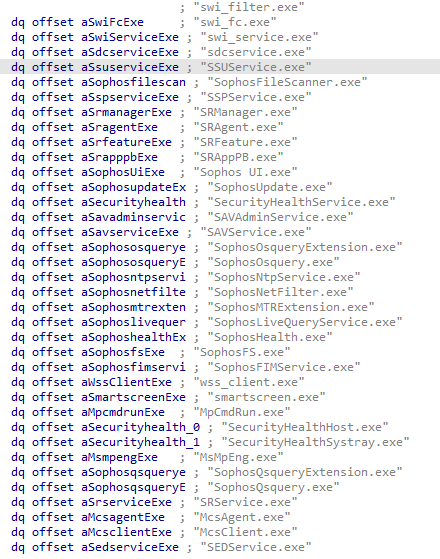
The PROCEXP.SYS driver includes the following vendor-specific (Sysinternals) IOCTL codes:
- Get a handle to an EDR protected process (0x8335003c)
- Terminate the EDR protected process (0x83350004)
Terminate/suspend the process and drain out the process memory
The AuKill malware captures a snapshot of the listed EDR process names to obtain their process IDs. Using these process IDs, AuKill acquires an open handle to each specified process.
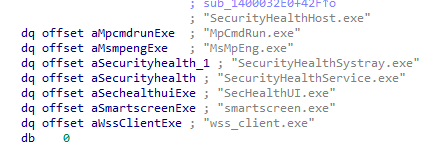
The EDR protected processes automatically restart within a few seconds. To disable them permanently, the AuKill malware performs the following actions:
- Terminates the EDR/AV process
- Suspends the EDR/AV process
- Finally, the Aukill program unmaps the entire view of the memory section from the virtual address space of an EDR/AV process. This technique is called “Process Draining”.
Process Draining
This technique employed by the AuKill malware does not terminate the EDR/AV process; rather, it releases all memory referenced by an EDR/AV process section, severely impairing its functionality. The EDR/AV process continues to run but operates in a malfunctioning state. As a result, the EDR/AV user interface (UI) becomes unresponsive and shuts down unexpectedly
The EDR/AV system gathers machine telemetry through background EDR processes, transmitting this data to detection servers, which may give the appearance that the EDR is actively monitoring the machine. However, in reality, the main EDR process’s memory has been wiped out by the AuKill malware, causing the EDR to cease detecting and responding to malicious activities, resulting in missed detections for the EDR/AV product.
Delete the AV/EDR service
The Aukill program accesses the service control manager database and retrieves the handle to the following services.
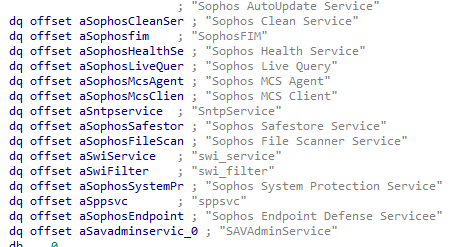
The AuKill malware halts the EDR/AV services by utilizing the ControlService function. Subsequently, it disables these services using the ChangeServiceConfigW function. Once disabled, the EDR/AV services cannot be restarted, and any attempt to do so by the EDR/AV product results in the error code ERROR_SERVICE_DISABLED. Ultimately, the AuKill program deletes the EDR/AV services.
Unload the AV/EDR driver
The Aukill program utilizes AdjustTokenPrivileges function to enable additional privileges and attempts to unload the following EDR drivers:
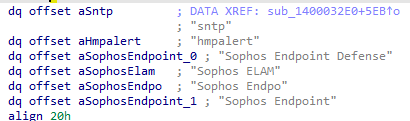
The program employs NtUnloadDriver function to dynamically unload a driver from the running system.
Microsoft Protections
Threat actors are leveraging vulnerabilities in legitimate, signed kernel drivers to execute malware at the kernel level. Microsoft has introduced a new feature named “Vulnerable Driver Blocklist” to address this issue. This blocklist is enabled by default on all devices and can be toggled on or off through Windows Security. Microsoft advises incorporating the blocking of the list of drivers into your existing App Control for Business policy.

Demo
Author: Hema
 reversing stories....